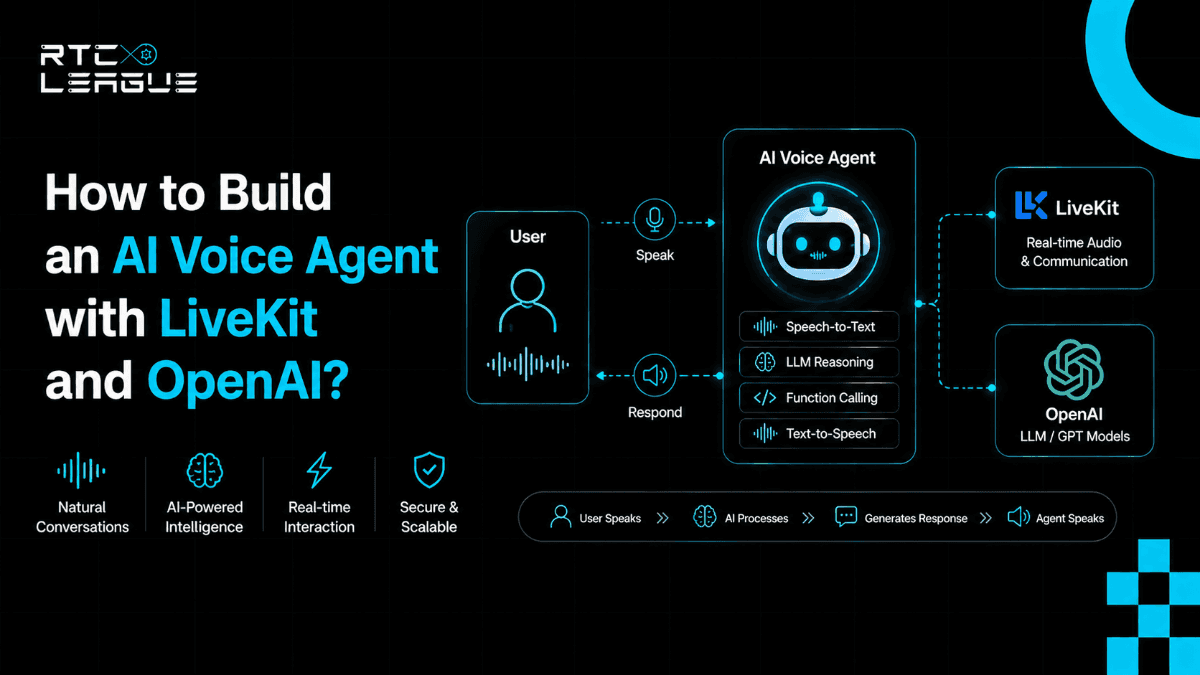

AI voice agents stopped being a research project somewhere around late 2024. By 2026, they're in production, handling customer support calls, running sales qualification, powering healthcare intake, and replacing IVR trees that nobody liked anyway. The architecture that makes them work at low latency has largely converged around the same stack: a WebRTC layer for real-time audio transport, an LLM for reasoning and response generation, and a text-to-speech engine to close the loop.
LiveKit and OpenAI together cover most of that stack cleanly. LiveKit handles the WebRTC media infrastructure, room management, audio routing, and participant handling. OpenAI brings the speech-to-text via Whisper, the language model via GPT-4o, and text-to-speech to push audio back to the user. The integration between them, when done correctly, gets you a working voice agent with latency that doesn't feel broken.
This guide walks through how to build one. Not a toy demo, a working architecture you can extend into production.
What You're Building
By the end of this guide, you'll have a voice agent that:
Accepts an inbound audio connection from a user via a LiveKit room
Streams audio to OpenAI's Whisper model for real-time transcription
Passes the transcribed text to GPT-4o for response generation
Converts the response to speech and streams it back through LiveKit
Handles turn-taking so the agent doesn't talk over the user
The architecture is server-side. The agent runs as a LiveKit participant, an agent process that connects to the room, subscribes to audio tracks, and publishes its own audio in response.
Prerequisites
Before starting, you'll need:
Python 3.9 or later
A LiveKit server running (self-hosted or LiveKit Cloud)
An OpenAI API key with access to Whisper and GPT-4o
Basic familiarity with async Python
If you're running LiveKit locally for development, the fastest path is Docker:
This gives you a local LiveKit instance with a fixed API key and secret (devkey / secret) that you can use during development.

Step 1, Install Dependencies
A quick note on what each package does:
livekit-agents is the framework for building server-side agents that connect to LiveKit rooms as participants. It handles the WebRTC connection, audio track subscription, and the event loop your agent runs inside.
livekit-plugins-openai wraps OpenAI's Whisper (STT) and TTS APIs into LiveKit-compatible interfaces. It handles chunked audio streaming so you're not waiting for a full utterance before processing starts.
livekit-plugins-silero provides WebRTC Voice Activity Detection, a lightweight model that detects when someone is actually speaking versus silence. This is what makes turn-taking work without the agent constantly processing dead air.
Step 2, Set Up Your Environment
For production, replace the LiveKit values with your actual server URL and credentials. If you're using LiveKit Cloud, the URL will be in your project dashboard.
Step 3, Write the Agent
This is the core agent. When it starts, it connects to any LiveKit room it's dispatched to, subscribes to the audio track from participants, and runs the STT → LLM → TTS pipeline in response to speech.
Step 4, Run the Agent
python agent.py dev
The dev flag runs the agent in development mode, connecting to your local LiveKit server and polling for jobs. When a user connects to a room, the agent automatically joins as a participant.
To test it, you can use LiveKit's web playground at https://meet.livekit.io pointed at your local server, or build a minimal frontend with the LiveKit JS SDK.
Step 5, Connect a Frontend
For a minimal browser client that connects a user to a room and lets them talk to the agent:
The userToken is a JWT you generate server-side using your LiveKit API key and secret, scoped to the specific room and participant identity. Never generate tokens in the browser, always on the server.
Step 6, Customize the Agent Behavior
The system prompt in Step 3 is where most of the behavioral customization happens. A few patterns worth knowing:
For a customer support agent:
For handling interruptions:
The allow_interruptions=True flag on assistant.say() tells the agent to stop speaking if the user starts talking. This is on by default in VoiceAssistant, but worth knowing it's controllable, some use cases (guided flows, IVR-style agents) benefit from disabling it.
Step 7, Handle Edge Cases Before Production
A few things that catch teams off-guard when moving from demo to production:
Silence detection tuning: Silero's VAD has sensitivity settings. The defaults work well for most environments, but if your users are on noisy connections or mobile networks, you'll want to adjust the threshold. Aggressive silence detection causes the agent to cut off users mid-sentence. Loose detection causes unnecessary processing of dead air.
Latency budgeting: The pipeline has three latency components: STT (Whisper processing), LLM (GPT-4o generation), and TTS (audio synthesis). Each adds time. In practice, end-to-end latency on a well-configured deployment runs between 800ms and 1.5 seconds from the user finishing a sentence to the agent starting its response. If you need tighter than that, streaming TTS, where the agent starts speaking as tokens arrive rather than waiting for the full response, helps significantly.
Conversation context management: GPT-4o has a context window. Long conversations accumulate messages. Build a context management strategy before you need one, a simple rolling window that keeps the last N turns plus the system prompt handles most cases.
TURN server configuration: Users behind corporate firewalls or on restricted mobile networks often can't establish direct WebRTC connections. Without properly configured TURN servers, those calls drop at connection or experience significant degradation. This is an infrastructure problem, not an application problem, but it's your problem once you're in production.
What This Architecture Scales Into
The agent you've built here is a single participant in a single room. The LiveKit Agents framework is built to scale horizontally, you run multiple worker processes, and LiveKit dispatches jobs to available workers. At scale, you're running a pool of agent workers behind your LiveKit server, each capable of handling one concurrent conversation.
For high-volume deployments, contact centers, inbound voice automation, anything handling hundreds of concurrent calls, the infrastructure layer underneath this matters considerably. The agent code stays largely the same. What changes is the media server configuration, the TURN infrastructure, the monitoring setup, and the operational model for keeping it running reliably.
This is the gap between a working prototype and a production voice agent platform. The code gets you to the prototype. Getting to production requires the infrastructure behind it to be handled correctly.
Where RTC LEAGUE Fits Into This
RTC LEAGUE manage the LiveKit infrastructure layer for teams building exactly this kind of architecture. The agent code is yours, the media server configuration, TURN setup, scaling, monitoring, and operational management is ours.
If you're building a voice agent product and you want the WebRTC infrastructure to be handled by people who run it specifically, rather than figuring it out alongside everything else you're shipping:



-(1).jpg)
.jpg)