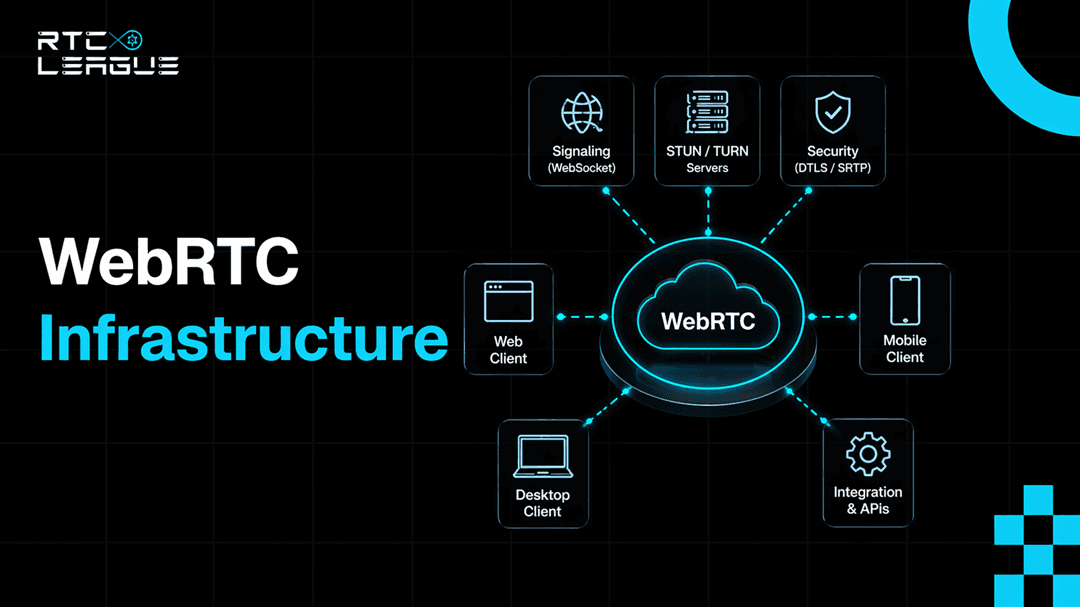

WebRTC infrastructure is the complete stack required to make real-time communication reliable at scale: a signalling server to negotiate sessions, STUN servers for routable addresses, TURN servers to relay media when direct connections fail, media servers for group calls and recording, distributed edge infrastructure, and observability tooling that catches failures before your users do.
None of these is optional. The WebRTC spec is silent on almost everything above the media transport layer; it defines how to encode and encrypt, not how to build signalling, scale TURN, or architect an SFU cluster. Those problems are yours. This guide covers all of them.
The Protocol Stack
Before touching infrastructure, you need a clear mental model of what WebRTC does at the protocol level. Your infrastructure decisions map to specific layers of this stack, and misunderstanding one layer sends you debugging the wrong thing in production.
WebRTC is not a single protocol. It is a stack of protocols, each handling a specific job.
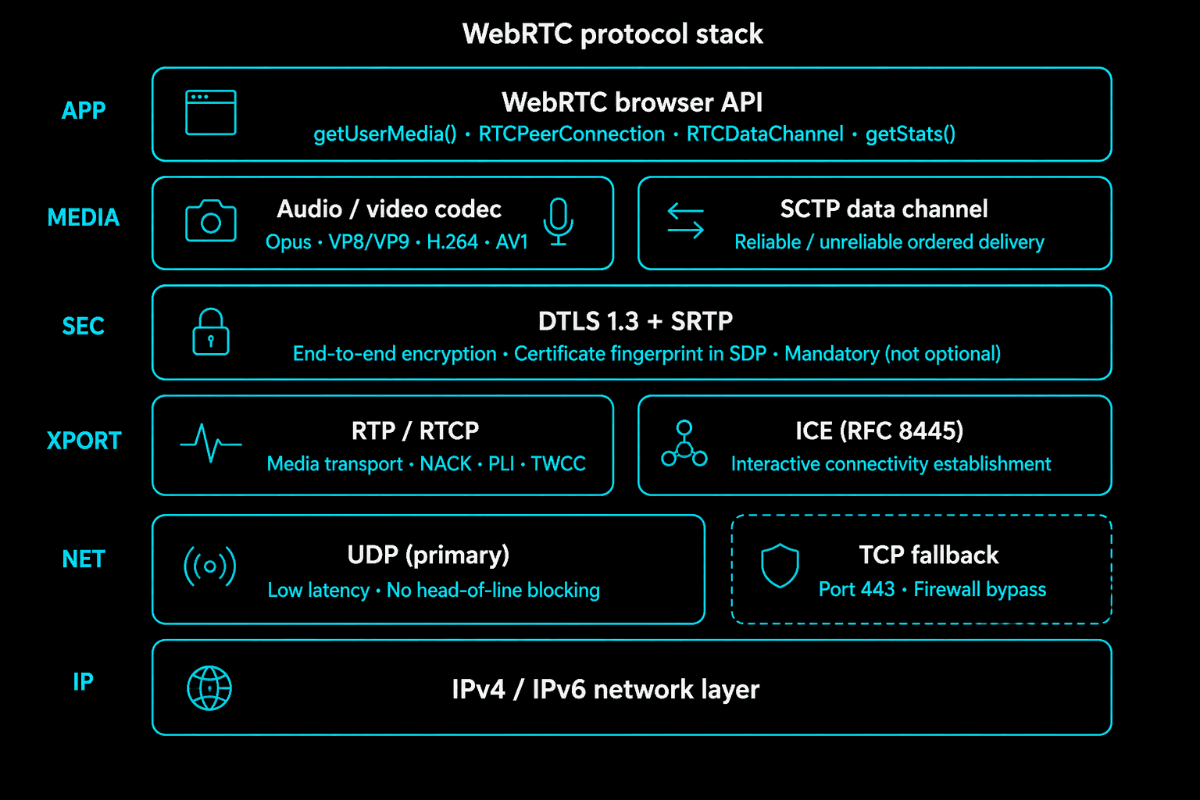
At the top, the browser API gives you getUserMedia() for capturing media, RTCPeerConnection for managing the connection lifecycle, and RTCDataChannel for arbitrary data. Everything else, encryption, transport, codec negotiation, happens inside RTCPeerConnection and below.
For audio, Opus is universal: 6 kbps narrowband through 510 kbps full-bandwidth, adjusting dynamically to conditions. For the video, the landscape is fragmented. VP8 is old but universally supported. H.264 has hardware acceleration on nearly every mobile device and is what most SIP systems speak natively. VP9 improves on VP8 for web-to-web calls. AV1 offers better compression but higher encode complexity, viable as hardware encoders ship in modern devices.

Below the codec layer, all WebRTC media is encrypted, mandatory, not optional. DTLS establishes session keys. SRTP encrypts every media packet. The DTLS certificate fingerprint gets embedded in the SDP during signalling, which is how peers verify they are talking to the right endpoint rather than a man-in-the-middle.
Transport runs on RTP for media and RTCP for control messages, loss reports, bitrate feedback, and jitter statistics. Both run over UDP by default. This is why WebRTC achieves low latency: UDP skips retransmission waiting, so there is no head-of-line blocking. On networks that block UDP, WebRTC falls back to TCP over port 443. It works, but UDP is always the better path.
Underneath everything, ICE determines which network path to use. It gathers all possible addresses a client can be reached at, shares them through signalling, and runs connectivity checks. ICE is what makes WebRTC work across NAT and firewalls, or fail when the infrastructure behind it is misconfigured.
Signalling: The Piece Everyone Gets Wrong
WebRTC does not define a signalling protocol. The spec leaves the transport entirely open. This means every WebRTC implementation reinvents signalling, often in ways that create problems at scale.
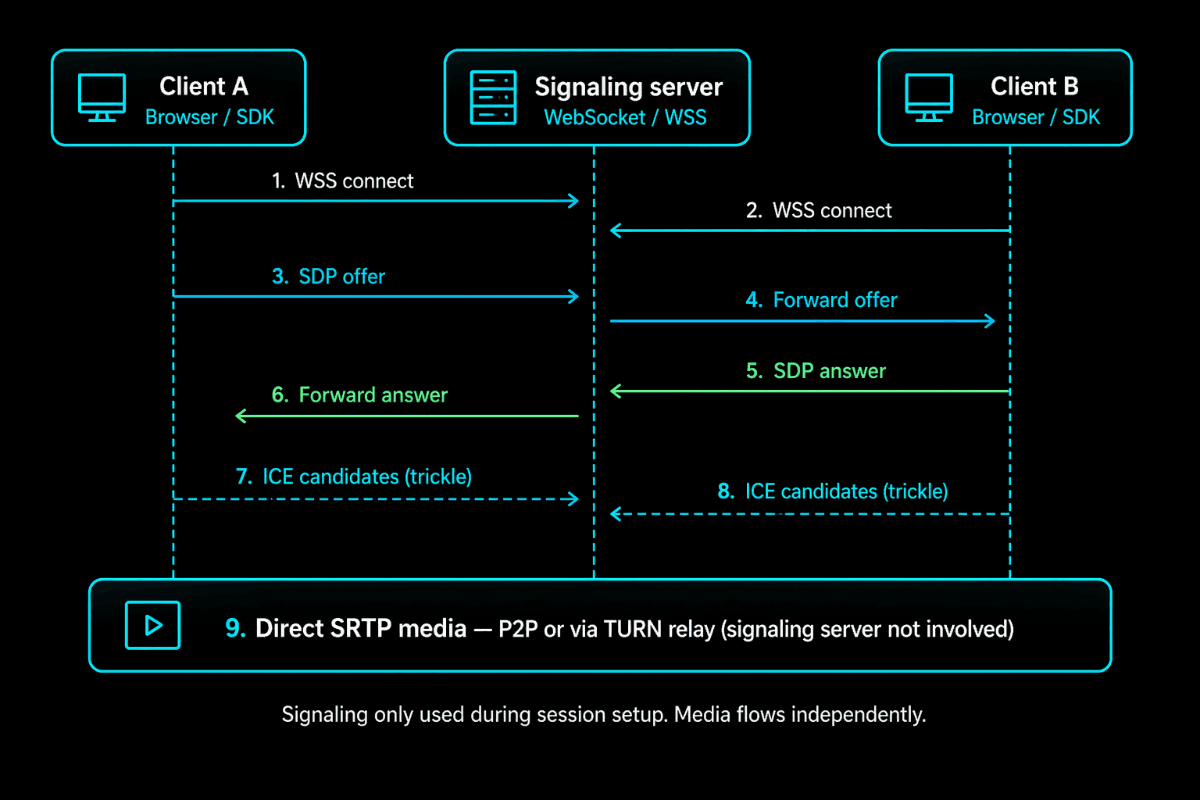
When Peer A wants to connect to Peer B, A creates an SDP offer, a text document describing the media A wants to send, which codecs it supports, its ICE credentials, and its DTLS fingerprint. This goes to the signalling server, which forwards it to B. B creates an SDP answer and sends it back. Simultaneously, both peers trickle ICE candidates through the signalling channel as they discover them.
Once this exchange is complete, ICE takes over and finds the actual connection path. The signalling server is done. It never touches the media.
This matters for scaling. Signalling load is bounded by the session establishment rate, not the concurrent call count. The server handles a burst when many calls start, then is mostly idle. But it must be reliable; when signalling goes down, no new calls can start, even though active calls keep running.
WebSockets over TLS (WSS) is the right default for browser clients. The connection stays open for the call duration, supporting ICE restarts and renegotiation. You need sticky sessions at your load balancer, IP hash or session cookies, so clients stay on the same signalling node. And you need Redis for shared session state, so room data is accessible to any node, not locked to a single instance.
If you are connecting to SIP infrastructure, SIP over WebSocket (RFC 7118) is the right protocol. It is what PBX systems already speak and provides a natural path to PSTN interoperability.
One mistake that trips up teams: storing room state only in process memory. When that server restarts, every active room disappears, and clients cannot rejoin. Redis costs almost nothing and eliminates this entire failure mode.
NAT Traversal: STUN, TURN, and ICE
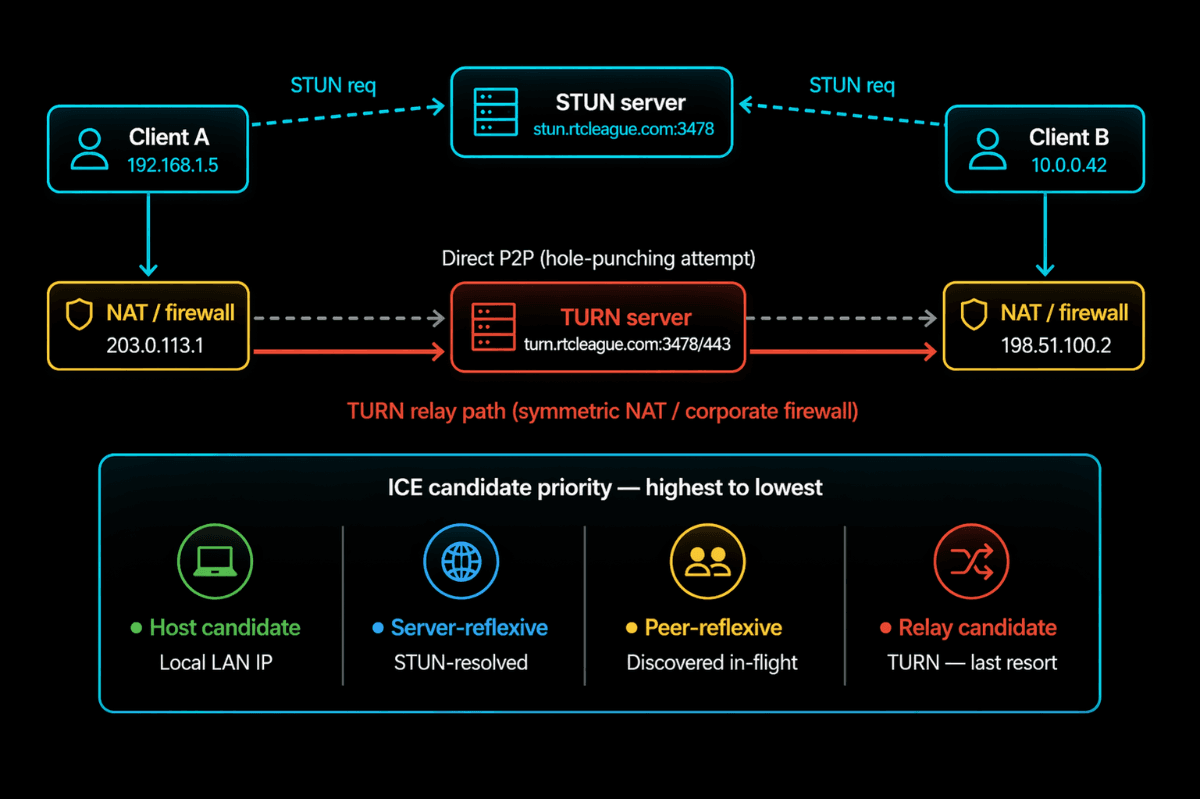
When a WebRTC call starts, each client gathers ICE candidates, all the network addresses it can potentially be reached at. Among these is a host candidate: the device's local IP, something like 192.168.1.42, a private address that means nothing outside the local network.
For peers on different networks to connect, they need routable public addresses. That is what STUN handles.
STUN (RFC 5389) is a simple lookup protocol. The client sends a binding request to the STUN server. The server reads the source IP and port on that incoming packet, the public address as seen from outside the NAT, and returns it. The client includes this server-reflexive address as an ICE candidate. Now it has something routable.
In the common case, that is enough. Both clients share their public addresses, ICE hole-punches through the NAT on both sides, and a direct connection is established, no relay involved.
But there is a class of NAT behaviour, symmetric NAT, where this fails. With symmetric NAT, the public address the router assigns depends on the destination. The address seen from the STUN server differs from the address that would reach another peer. ICE checks fail.

This is where TURN enters. TURN is a relay. Both clients connect to the TURN server instead of each other. Client A sends media to TURN; TURN forwards it to B. B sends it to TURN; TURN forwards it to A. As long as both clients reach the TURN server, and they can, because TURN runs on TCP/443, the call works.
The cost: TURN carries the full media payload bidirectionally. A 720p call passes 2–3 Mbps through TURN. At 1,000 concurrent calls with 40% hitting relay, that is 800–1,200 Mbps of bandwidth. Real infrastructure costs that require planning.
The 40% figure is conservative. In corporate enterprise environments with managed firewalls, TURN relay rates of 60–70% are common. Build for it.
Two configuration points that matter in production: always TURN on TCP port 443 with TLS. Corporate firewalls frequently block UDP. Port 443 is rarely blocked; it is the HTTPS port. This single change resolves most "WebRTC doesn't work on our corporate network" issues. And never hard-code TURN credentials in client code. Generate short-lived HMAC-SHA1 credentials server-side, per session, expiring in 24 hours. Stolen static credentials turn your TURN server into an open relay at your expense.
Media Server Topologies: P2P, SFU, and MCU
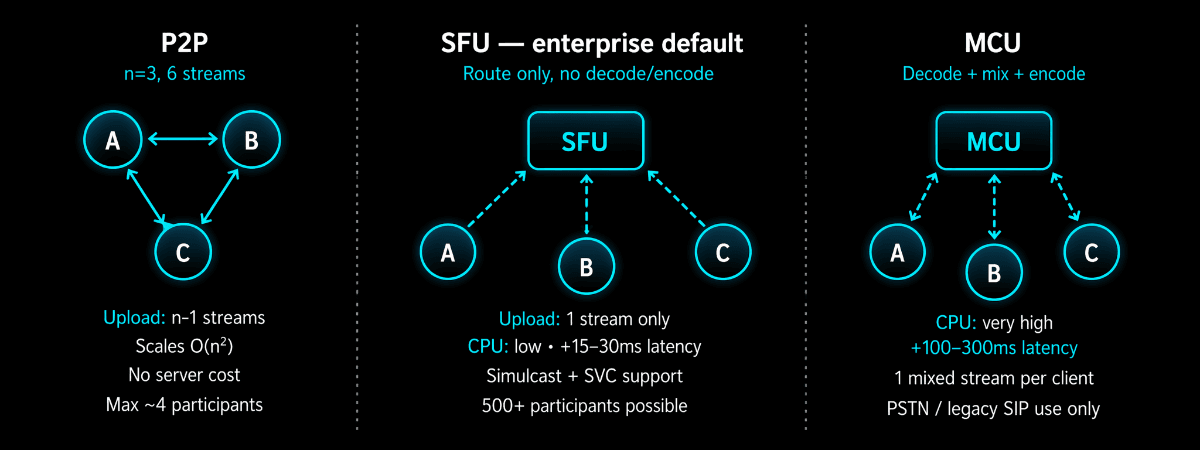
Peer-to-peer: works only for 1:1 calls and very small groups. Every participant sends directly to every other participant. Connections grow as O(n²). Most home connections max at 10 Mbps upload. At 1 Mbps per video stream, you hit the wall at 5 participants. P2P is correct for 1:1 and wrong everywhere else.
SFU: (Selective Forwarding Unit) is the right answer for almost every enterprise group call. Each client uploads once to the SFU. The SFU forwards streams to subscribers without decoding or re-encoding them, it reads RTP packet headers, makes a forwarding decision, and sends the packet. CPU cost stays low relative to participant count because it is doing I/O, not transcoding.
Simulcast: is what makes SFU powerful for variable network conditions. The client encodes three quality tiers, 1080p, 360p, and 180p, and uploads all three. The SFU delivers the appropriate tier to each subscriber based on their available bandwidth. A user on a fast office connection gets 1080p. A user on a congested mobile gets 180p. Subscribers on good connections are unaffected by subscribers struggling on poor ones.
For production SFU deployments, Mediasoup is the most mature open-source option, written in Node.js and C++ with a strong production track record. LiveKit is newer, written in Go, faster to stand up, but less flexible for custom use cases. Janus is the classic battle-tested choice.
MCU: (Multipoint Control Unit) decodes every stream, composites a mixed layout, and re-encodes for each participant. The problem is that all the decode-composite-encode work is CPU-intensive; an MCU serving 30 participants needs more compute than an SFU serving 300. Use the MCU only when bridging WebRTC to PSTN or legacy SIP endpoints that cannot handle simulcast. That is the only valid case remaining.
Scaling to Enterprise Load
Signalling is stateful but CPU-light. Long-lived WebSocket connections, session state in Redis, sticky sessions at the load balancer. Works up to millions of concurrent sessions without dramatic complexity.
TURN is bandwidth-constrained, not CPU-constrained. Vertical scaling hits NIC limits. Horizontal scaling means adding TURN instances per region via GeoDNS. Keep instances below 70% bandwidth capacity. Expand the OS port range; Linux defaults to ports 32768–60999 (28,000 ports). More than a few thousand concurrent TURN sessions per server requires net.ipv4.ip_local_port_range = 1024 65535.
SFU scaling is about CPU and NIC throughput per node. A well-tuned mediasoup deployment handles roughly 500–800 concurrent video participants per node. For global scale, cascaded SFU connects regional nodes into a mesh, media enters the SFU nearest the publisher and forwards to nodes closest to subscribers. Without a cascade, distant subscribers absorb the full network latency penalty on every frame.
Security Architecture
WebRTC's baseline security is solid, DTLS-SRTP encrypts all media, ICE credentials prevent stream injection, and certificate fingerprints prevent man-in-the-middle attacks. Enterprise deployments need more than a baseline.
TURN credential abuse is the most common production security failure. TURN servers with static or no credentials get discovered and used as open relays. The solution is to use codes called time-limited HMAC-SHA1 credentials. The server makes these codes for each session. They stop working after 24 hours. The TURN server checks the time and signature on these codes every time they are used. If the codes are old, they do not work anymore. The TURN server makes sure that old codes are not used. Time-limited HMAC-SHA1 credentials are only good for a time, so they are safe.
Relay target restrictions close the internal network probing risk. Without them, an attacker allocates a relay on your TURN server and routes traffic to your internal addresses. The denied-peer-ip setting in Coturn blocks RFC1918 and loopback ranges. Set this in every production deployment.
Signalling authentication is your first access control layer. Every WebSocket connection should present a JWT validated before session creation, bound to a session ID, and used to authorize room joins as well as initial connection.
For industries that have a lot of rules, like healthcare, finance, and law, you should look at WebRTC Insertable Streams. This is because WebRTC Insertable Streams can keep your information safe from one end to the other, even if someone gets into the SFU. The problem is that if you use WebRTC Insertable Streams, you will not be able to record things on the server or use intelligence to look at your media. So you have to decide if this is a trade for you based on what you need to do to follow the rules. WebRTC Insertable Streams are an option for end-to-end encryption, to-end encryption and you should consider using WebRTC Insertable Streams for your industry.

Quality of Service and Adaptive Bitrate
WebRTC's built-in congestion control, TWCC, estimates available bandwidth by tracking packet arrival times and signalling this to the sender via RTCP. The sender adjusts the bitrate. But the response timescale is seconds. Users experience degradation before it catches up.
NACK requests retransmission of lost packets. Worth the cost for video, where a missing packet corrupts a predicted frame. Disabled for audio where the latency is too tight.
PLI requests a full keyframe when packet loss is severe enough that the decoder cannot reconstruct the current frame, visible as a brief freeze followed by recovery. Frequent PLI requests signal that loss has crossed the threshold where NACK cannot keep up, typically 3–5%.
Simulcast with SFU layer switching is the most effective tool for variable network conditions. Three upstream quality tiers; SFU switches delivery per subscriber as conditions change. Fast connections get high quality; slow connections get reduced quality, independently, without affecting each other.
On codec selection for mobile: H.264 hardware encode and decode ships on essentially every iOS device and most Android devices. Hardware encoding uses a fraction of the CPU and battery of software VP9. If significant users are on mobile, H.264 delivers better sustained quality because devices maintain the target bitrate without thermal throttling.
Deployment Patterns
Fully managed - vendor API (Twilio, Agora, Daily.co) handles signaling, TURN, and SFU. You write application logic only. Correct when volume is under a few million minutes per month and speed matters. Above that threshold, per-minute pricing significantly exceeds the cost of operating your own stack.
Hybrid - you own signaling and application layer, use a managed TURN service for NAT traversal, and self-host an SFU on your cloud. Most serious enterprise deployments land here. You control the critical media path, avoid managed-platform margins on relay bandwidth, and retain SFU flexibility.
Fully self-hosted - you operate every layer: coturn, custom signaling, globally distributed SFU. Lowest per-minute cost at scale. Requires deep RTC expertise or a capable partner. Makes sense above roughly 5 million minutes per month.
Deciding between these patterns is straightforward on paper. Executing them in production is a different problem. The decisions above, how you cascade SFUs across regions, how you configure coating to handle symmetric NAT without becoming an open relay, how you set RTCP feedback aggregation so your SFU does not flood presenters with control traffic, require engineers who have debugged these systems under real load, not just read the specs.
This is where the RTC LEAGUEoperates. We design and run WebRTC infrastructure for enterprises where real-time communication is a core product requirement, geo-distributed TURN clusters on TCP/443 with HMAC credential management, mediasoup and LiveKit SFU deployments at tens of thousands of concurrent participants, signaling infrastructure built for failover, and WebRTC-to-SIP gateways that bridge existing telephony without adding transcoding latency where it can be avoided. TelEcho, our AI voice platform, runs on this same stack.
When a TelEcho agent joins a call, it negotiates ICE candidates, relays through TURN when needed, and transmits over the same SRTP-encrypted path as any other participant, the only difference is that the audio on the other end comes from a model trained for low-latency conversational response rather than a human with a headset. That is what enterprise AI voice looks like when it is built on the right transport foundation from the start, rather than bolted onto something not designed for it.
Monitoring What Actually Matters
Most WebRTC monitoring watches the wrong things. Server uptime and CPU are necessary but insufficient. The actual signal is call quality as experienced by the user, and that data does not come from server-side metrics.
RTCPeerConnection.getStats() is what you want. The browser exposes per-connection statistics on everything: packets lost, jitter, frame rates, active ICE candidate type (including whether the call is going through TURN), estimated bandwidth, and decode time. Poll this every 5 seconds and send it to your telemetry backend. This is per-session quality data that no server can give you.
The metrics that tell you something real: ICE establishment rate, below 97% points to STUN/TURN misconfiguration. TURN relay ratio, a sudden spike often means STUN is broken and everything is falling to relay. Packet loss at the 95th percentile, the average hides the users having a bad experience; loss above 3% makes audio difficult to follow. Round-trip time, above 200ms, degrades conversational feel; above 400ms, natural conversation becomes difficult. Call setup time, above 5 seconds, users abandon calls before they start.
Build dashboards showing quality distribution across active calls, not just server health indicators. When a user reports a bad call, you should be able to pull that session's stats and see exactly what happened, not guess.

WebRTC + SIP/VoIP Integration
Most enterprise WebRTC deployments connect to SIP infrastructure, trunks, IP-PBX systems, PSTN, and increasingly to AI voice platforms like TelEcho operating on the same stack.
The core incompatibility: WebRTC requires DTLS-SRTP and ICE. Standard SIP uses plain RTP without DTLS and does not speak ICE. A WebRTC client and a SIP endpoint cannot connect directly. A gateway is required.
That gateway, an SBC or WebRTC-SIP gateway, translates signalling between SIP INVITE flows and WebRTC offer/answer exchanges, terminates the DTLS-SRTP session on the WebRTC leg, and presents plain RTP to the SIP side. Where codecs differ, it transcodes between them.
Transcoding adds 60–150ms of latency per leg and consumes significant CPU. If you can influence your SIP endpoints, push for H.264 or Opus support. Modern softphones support both. A transcoding-free media path is lower latency and better quality, even when G.711 is unavoidable at the PSTN edge.
For AI voice agents: systems like TelEcho connect to the gateway as a SIP endpoint. The gateway sees a standard SIP caller. The WebRTC client sees a remote peer. The AI handles conversation logic above the transport layer; WebRTC is agnostic about what generates the audio on the other end.
For the SIP proxy layer: Kamailio for high-volume production. Asterisk when you need PBX logic alongside the gateway function. FreeSWITCH when you need MCU-capable processing for PSTN conference bridges.


-(1).jpg)
.jpg)